
Customer support · 3 min read
How to collect after-hours support messages in HelpCrunch
Set HelpCrunch operating hours and write an offline message your team can follow through on. Start with one page and one visitor question.
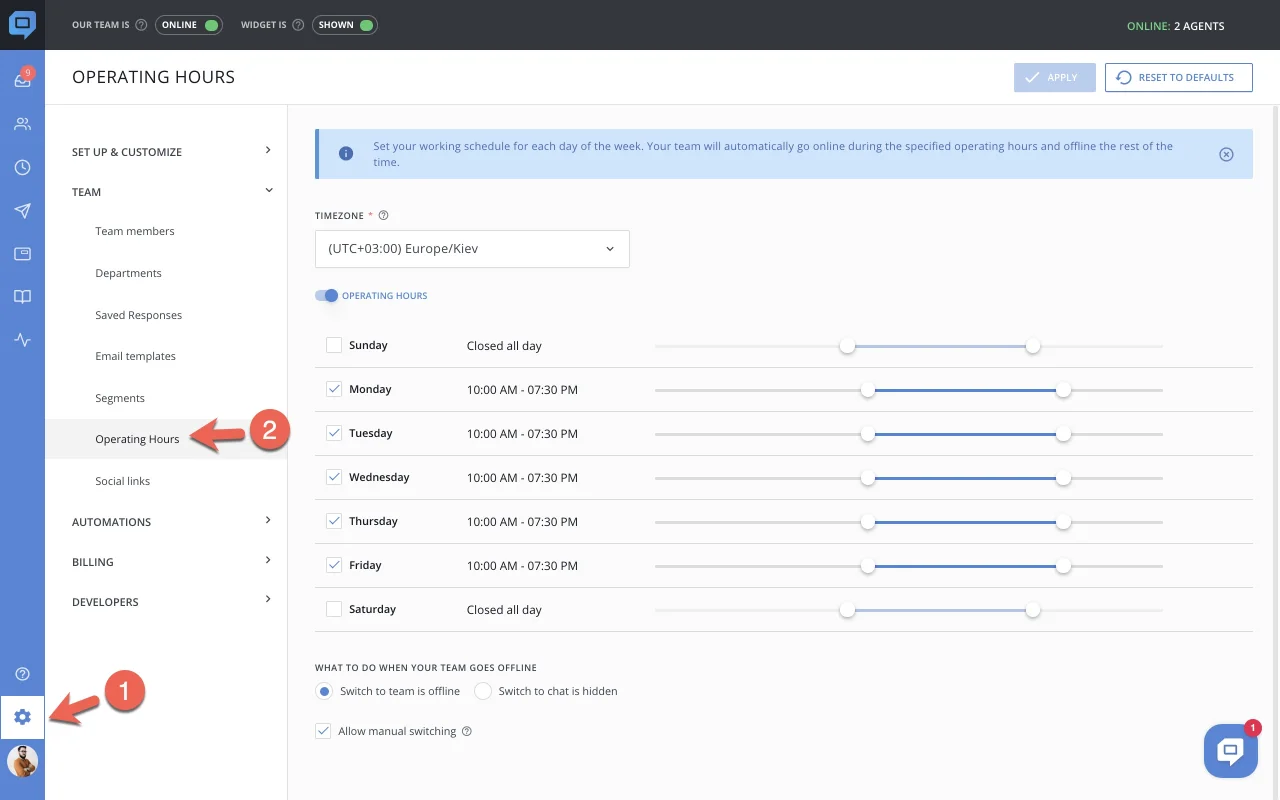
It’s 11 p.m. and someone on your pricing page wants to know if two coworkers need two seats. The chat button promises a conversation, but nobody is at a desk. HelpCrunch can switch the widget between online and offline according to your operating hours. Visitors can still send a message when the team is away. The team decides when and how that conversation continues.
Write the promise your next shift can keep
Start with the time zone your support team actually uses. Under Settings → Operating hours, turn on the schedule and define the hours for each workday. In the website widget’s localization settings, edit the offline message. If a public holiday or a shared late shift changes what you can promise, check the wording before sending more traffic to that page.
“We’re away right now. Leave your question and a way to reach you. We’ll reply the next business day. If you saw an error, include the page and roughly when it happened.”
Only promise the next business day if someone owns the opening shift. If you use a stated time, include a time zone. For a pricing question, a team size and the plan the visitor was looking at can be enough. Keep passwords and payment details out of the conversation.
Follow one message through to the reply
From a visitor window, leave a question outside the hours you set. The person on duty should be able to see the question, when it came in and how to reply. Then switch back to the visitor view and confirm where the answer arrives. Choose one teammate to handle the first review of overnight messages. Assign a separate route for issues your team truly handles urgently.
If most questions come in through an established ticket queue, start with the pricing page so the widget has a clear purpose. You can expand once a real visitor can ask the question, leave enough context and hear back on the timeline you set.
ProductTally may earn a commission if you buy through these links.
Related guides
Official references
ProductTally may earn a commission if you buy through these links.