Workflow automation · 4 min read
What should an n8n workflow do after a human approval times out?
Use a sample quote to distinguish approval, rejection, and timeout in n8n, and keep a record that a reviewer can trace to the right version.
After preparing a quote, you can pause an n8n workflow with the Wait node and resume it after a form submission or a callback. If you configure a time limit, reaching the limit can resume the workflow too. Base the next action on the approval record. Send a quote only when that record contains an explicit approval for the same version.
Record what you are asking someone to approve
Suppose the quote is Q-104, version v2, and the reviewer has two business days. Use a shorter fixed window in a practice run. Save the quote ID, version, deadline, and pending state. Show the approver both the version and the deadline, with a way to approve, return it for changes, or leave a note. Use an existing authenticated approval channel in production. Check the approver’s permission and validate the quote ID and version. The official n8n documentation describes resume URLs created per execution and several authentication options for webhook-based resumes.
Handle all three outcomes after the workflow resumes
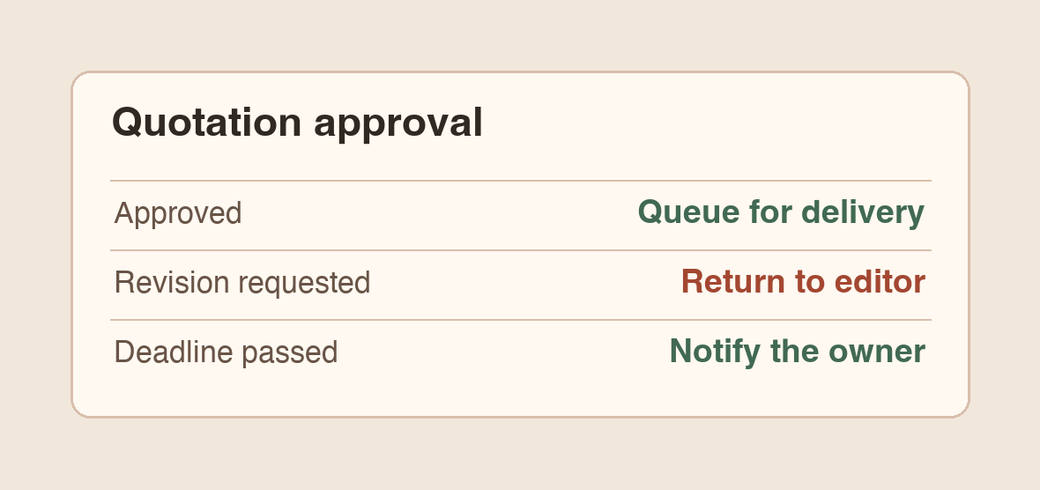
| Approval record when the workflow resumes | Next action |
|---|---|
| Explicit approval for the current version | Enter the final pre-send check and record who approved it and when. |
| Explicit request for changes | Return it for revision and keep it marked as unsent. |
| Deadline passed with no decision | Mark it timed out, notify the owner, and wait for a new approval request. |
Check whether the quote has changed before acting on a late reply. An approval from a previous round does not approve a new version. Keep enough detail to identify who made the decision, what they approved, and when. Connect live delivery only after the recipient, price, and approval record agree.
Test late and duplicate decisions with a log
Use three fictional quotes for the initial cases, then try a late response and a duplicate submission. Replace the send action with a test log. Observe which downstream steps ran and how often. These are suggested acceptance cases. Check the actual node output and any race between timeout and approval in the version you deploy.