
Productivity · 4 min read
How to let a customer book two hosts at once in Cal.com
Calculate a shared appointment window and verify both hosts get the same invitation in Cal.com.

A consultant is presenting the proposal and an account manager needs to confirm the scope. Set up a Collective event in Cal.com so the booking page offers times when both are available and invites both to the meeting. For an introductory call any teammate can handle, choose Round Robin.
Work out the first slot before opening the booking page
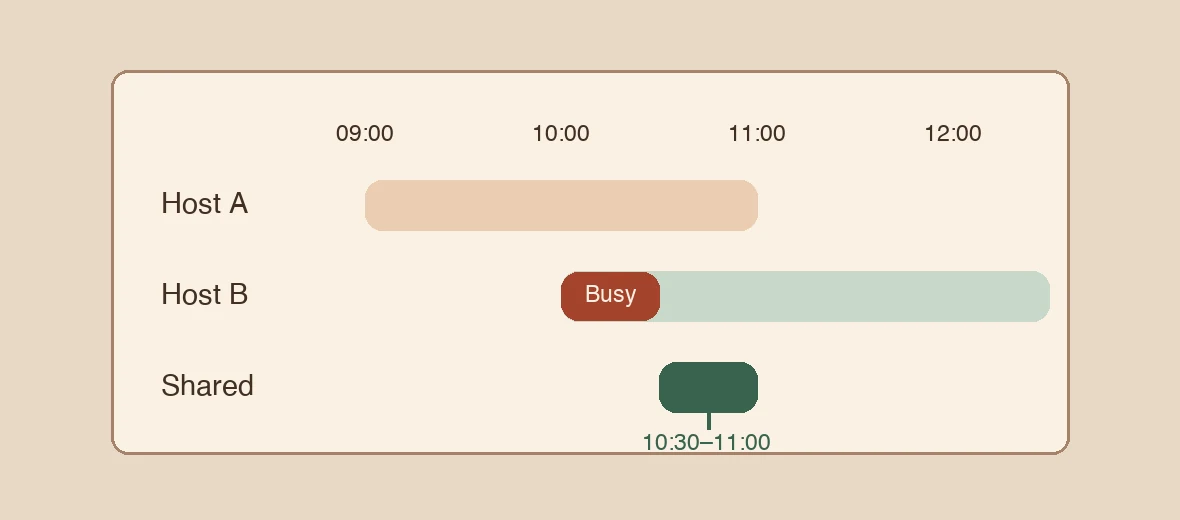
Suppose the consultant is available Tuesday from 09:00 to 11:00 in the customer's time zone. The account manager is available 10:00 to 12:30 and has a meeting from 10:00 to 10:30. The shared window is 10:30–11:00, enough for one 30-minute call. If the customer sees 09:00, check the event type and whether the second host's schedule is being used.
Create the Collective event and add both hosts. It uses their individual availability by default. Leave the common schedule unset for this rehearsal. Preview Tuesday as a visitor. Check start-time intervals, booking notice and buffers. If you add a 15-minute buffer, whether 10:30 remains available depends on the buffer settings and nearby events. Start with simple settings if you need to isolate the shared availability calculation.
Check the invitation on both calendars
Make a test booking as a visitor and open both hosts' calendars. Check the event, guest list and meeting link. Then try a separate test on an unbooked date with the same schedule, mark the account manager busy at 10:30 and see whether the slot disappears. If the page only books one host, check the host assignment and calendar connections. Before committing to the workflow, check the current team features available on your plan.
For the 10:30 result, assume both hosts are required, the notice period has already passed, and 10:30 is an allowed start time with no buffer. The example calculates the shared window on paper. Before sharing a link, verify both invitations in your account. Cal.com currently lists managed and collective links under Teams.
Visit official website
ProductTally may earn a commission if you buy through these links.
Cal.com · Visit official website
Related guides
Official references
ProductTally may earn a commission if you buy through these links.