
Workflow automation · 4 min read
Choose a Udemy Git course that teaches you to resolve merge conflicts
Reproduce a README conflict in a throwaway repo, keep both useful changes, and review the staged diff before finishing the merge.
Look for a Udemy Git course that gives you two versions of a file and asks you to explain the final text. A merge conflict is a request for a decision about the content. In a small team, your review should explain what each change was trying to preserve and whether the result still reads correctly.
Give each branch a reason to change the same line
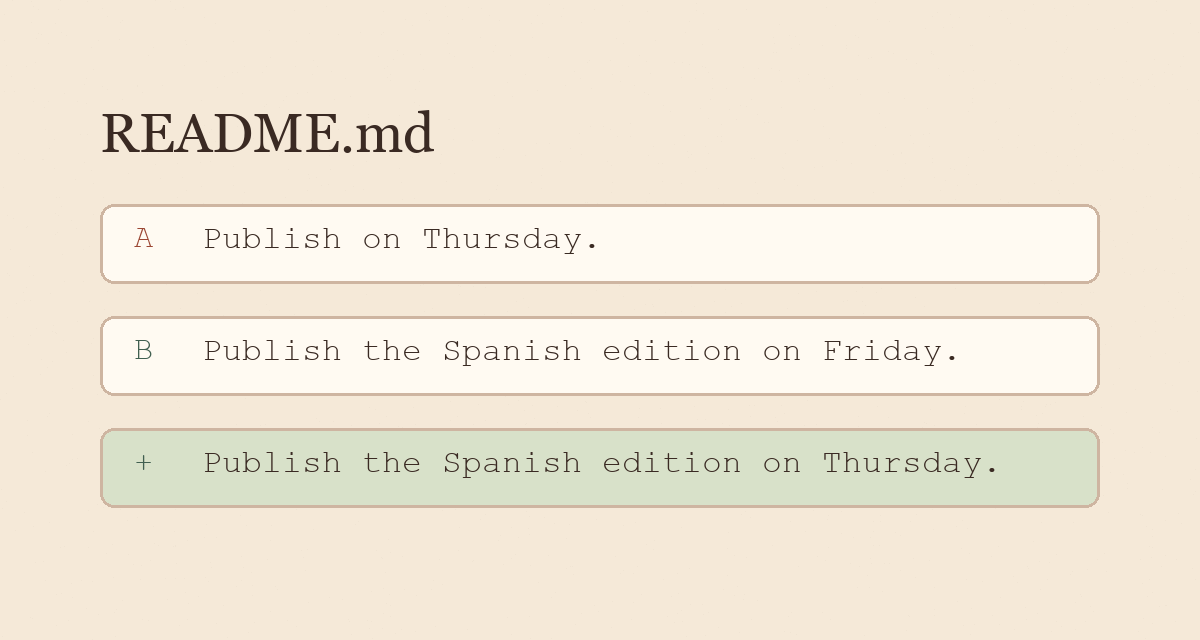
In a disposable local repository, commit a README that says “Publish on Friday.” Create divergent branches from that commit, with one branch’s README changed to “Publish on Thursday” and the other to “Publish the Spanish edition on Friday.” Commit both separately. Switch to the first branch and merge the second. Because both branches changed the same line differently, this setup is designed to produce a content conflict.
At the conflict, run git status and open the file. The block contains <<<<<<<, ======= and >>>>>>>, separating the versions. Assuming the Thursday deadline applies to the Spanish edition too, a possible resolution is “Publish the Spanish edition on Thursday.” If that deadline assumption is uncertain, ask the owner instead of guessing which edit takes precedence.
Check the file that will actually be committed
Remove the conflict markers as part of editing the sentence. Run git add README.md and git diff --cached. The final README should retain the edition and updated day. Then complete the merge with git commit and confirm the working tree status. If your team uses pull requests, explain both choices in the review so the next person can verify the decision.
Udemy’s *Git & GitHub – The Practical Guide* includes a merge-conflict lesson that uses VS Code and compares changes with git diff. Its outline also lists pull-request review. Preview a lesson if available and look for the step where the instructor reviews the resolved content, especially when both sides contribute something.
ProductTally may earn a commission if you buy through these links.
Related guides
Official references
ProductTally may earn a commission if you buy through these links.