
E-commerce · 3 min read
How can existing Payhip customers download the updated file?
Replace a file or keep both versions in one Payhip product, then check the original receipt and send a targeted update.
You sold a quote template and found that the total ignored discounts. Payhip says that when you replace a file in the same digital product, existing customers can use the download link in their original receipt to get the update without buying it again. Sending an update email is a separate step.
Decide whether customers need one version or two
For a broken formula, dead link, or missing asset, keep the corrected file available. Back up the original first, then edit the same product, remove the old file, upload the replacement, and save. A filename change from quote-template-v1.0.xlsx to quote-template-v1.1.xlsx helps readers recognise the new version. Note where the formula was fixed and when.
If the revision changes field names that customers use in their own automations, consider leaving both versions available with separate notes about which to use. Payhip supports adding another file without removing the old one. Keep a compatibility copy only if it remains safe to use.
Open the old receipt before sending an announcement
If you have an authorised test order from before the update, open its original receipt. Look for the new filename, check the version inside the file, and confirm that the total now includes the discount. A fresh order can help check the current setup, while an earlier receipt lets you check access for existing buyers. If the product uses a different editing experience, confirm how that editor exposes its files.
For example, enter $120 with a 15% discount. The fixed total should be $102 before tax. Use a copy of the file so you can repeat the same check on either version.
Send the update to customers of this product
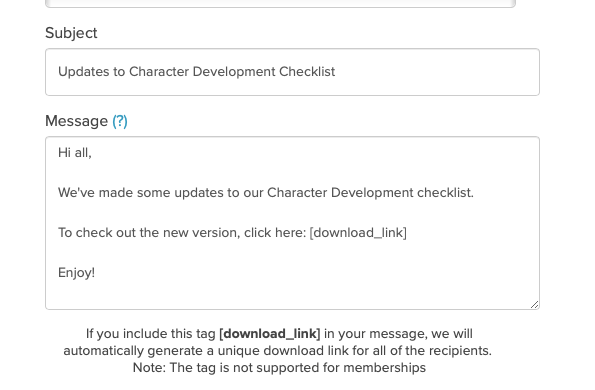
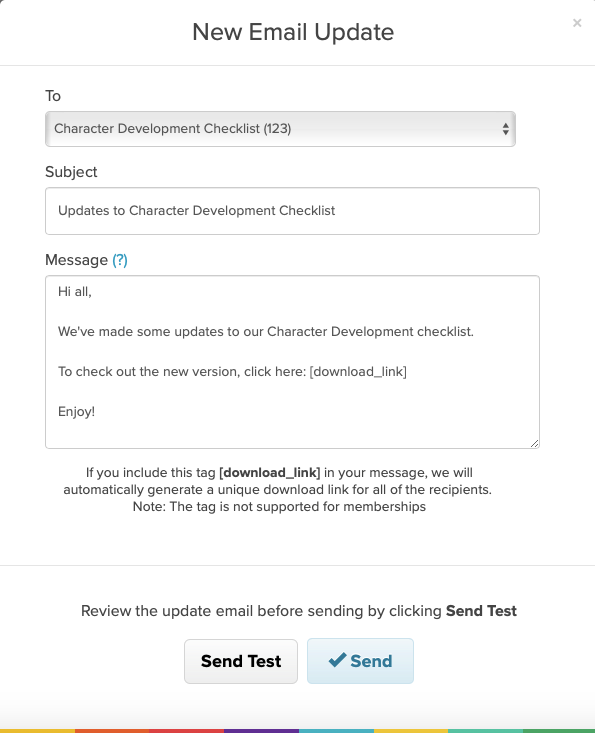
In Customers → Email Updates, select purchasers of this product and send yourself a test. For an update directed at buyers of a specific product, Payhip supports [download_link] to insert a unique link per recipient and reset their download credits. Payhip also notes that some EU buyers who did not opt in are excluded, so check the actual recipient list.
A short note can say what changed, who needs the fix, and where to get it. For example: “Version 1.1 fixes the total calculation after discounts. Download it using your original receipt and verify the total in a copy of any quote in progress.” If both versions remain available, say when buyers should use each one.
Visit official website
ProductTally may earn a commission if you buy through these links.
Payhip · Visit official website
Related guides
Official references
ProductTally may earn a commission if you buy through these links.