
Workflow automation · 3 min read
Choose a Udemy Python course with a first project: batch rename photos
Use a small file-renaming project to identify the Python lessons you need, from working with paths to handling naming conflicts.
For a first Python automation course on Udemy, look for file paths, loops and error handling. Then try a batch rename in a copy of a folder. Generate an old-to-new filename preview before renaming anything, and flag a duplicate or existing destination so you can resolve it first.
Turn a delivery folder into a course brief
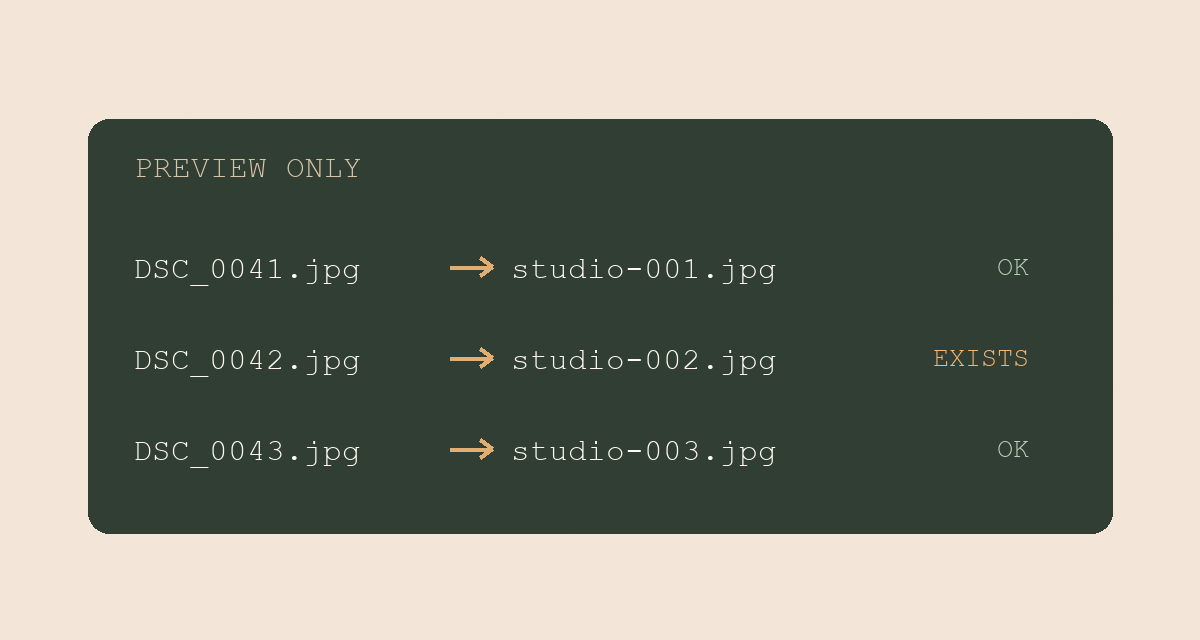
A photographer needs to deliver a small gallery. The files are DSC_0041.jpg, DSC_0042.jpg and DSC_0043.jpg, and the client wants a name like studio-001.jpg. The lesson you need should show how a program selects files in one folder, reads their names and works through them in a defined order. Decide whether that order should be alphabetical or match an existing shot list.
Al Sweigart’s Udemy course Automate the Boring Stuff with Python Programming lists flow control and error handling in its public syllabus. The author’s separate book has a chapter on organizing files and a worked filename project. Use that chapter to see what working with files looks like before you choose the course. The gallery exercise here is our own.
First produce a preview you can read
Make a local copy of the folder and add one non-photo file such as notes.txt. Plan the new names for JPEGs only and print one input and one destination per line. If DSC_0041.jpg maps to studio-001.jpg, preserve the .jpg extension and keep the text file out of the plan. A preview is especially valuable when the folder includes more than one camera or shoot.
Now put an existing studio-002.jpg in the sample folder, and make the preview flag the conflict. Keep the original files intact until every destination is unique. Once the plan looks right, apply it to the copied folder and keep the filename map with the delivery. This gives you a concrete question to ask of an introductory course: will I learn how to inspect and control a batch before it changes my files?
ProductTally may earn a commission if you buy through these links.
Related guides
Official references
ProductTally may earn a commission if you buy through these links.