Lite
One widget and one seat
- Monthly billing
- USD 29per workspace / month
- Monthly equivalent, billed yearly
- USD 21per workspace / month
 ProductTally

Website live chat and shared inbox
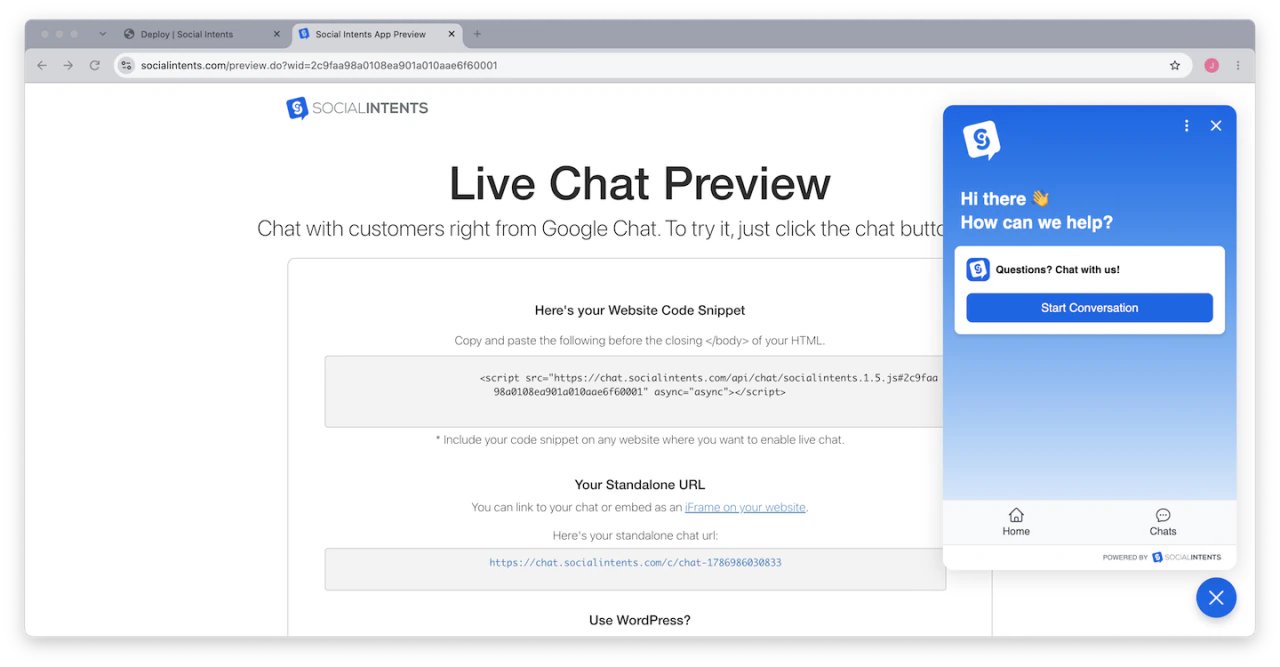
Social Intents adds live chat to a website. Support teams can preview the visitor experience and receive conversations in tools such as Teams or Slack.
ProductTally may earn a commission if you buy through these links.

ProductTally may earn a commission if you buy through these links.
Social Intents fits a small support team that already works in Teams, Slack or Google Chat. Preview a test conversation as a visitor and check which agent view receives it before adding the widget to a live page.
Preview the handoff and offline behavior before putting the widget in front of customers.
One widget and one seat
One widget and four seats on the current pricing page
Two widgets, unlimited seats
Five widgets, unlimited seats
Ten widgets, unlimited seats
The prices cover the plan. The pricing page and help center differ on some Starter limits, so confirm the applicable limits before subscribing. · Nov 11, 2026
ProductTally may earn a commission if you buy through these links.
Social Intents · View official plans and pricingProductTally may earn a commission if you buy through these links.
Preview as a visitor and send a sample message. Check which agent view receives it and what visitors see when no agent is online.
ProductTally may earn a commission if you buy through these links.
Official workflowProductTally may earn a commission if you buy through these links.
ProductTally may earn a commission if you buy through these links.
Social Intents documents a widget preview and agent integrations for Teams, Slack and Google Chat.
Official workflowPreview as a visitor and send a sample message. Check which agent view receives it and what visitors see when no agent is online.
Official workflowPreview the handoff and offline behavior before putting the widget in front of customers.
Official workflowRead about Social Intents in the ProductTally blog.
Web & forms · 4 min read
Route the widget to a Teams channel and use two simultaneous chats to check replies, handovers and closure.