
Video · 4 min read
Submagic: How do you keep bilingual captions from hiding a product demo?
Compare separate subtitle files and a stacked layout, then check the longest caption in the actual player.

Choose the delivery format first. Submagic lists a Mandarin and English setting for speech that switches languages in one recording. For viewers who need to select a language, test separate subtitle files. For viewers who need both languages on screen, preview both together. Check whether your editor can place two tracks on the same frame.
Check the tallest caption against the demo
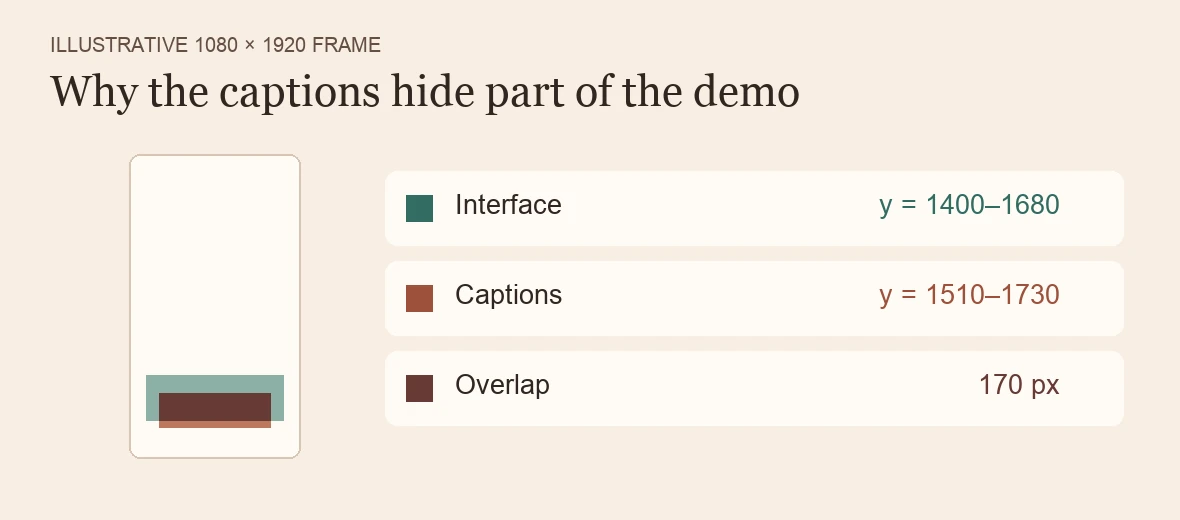
Try “Save it now” and “When the client opens the link, they will see the checklist” in both languages. In an illustrative 1080 × 1920 frame, interface content at y=1400–1680 and captions at y=1510–1730 overlap by 170 pixels. Shorten the caption, reposition the interface or move the captions.
Test the player where people will watch
Submagic documents burned-in and SRT exports. Play the longest cue with the player controls visible. With two subtitle files, switch languages and confirm each track stays synchronized.
Visit official website
ProductTally may earn a commission if you buy through these links.
Submagic · Visit official website
Official references
ProductTally may earn a commission if you buy through these links.