Free
Up to 1,000 words in the plagiarism checker.
Free
 ProductTally

Plagiarism checker
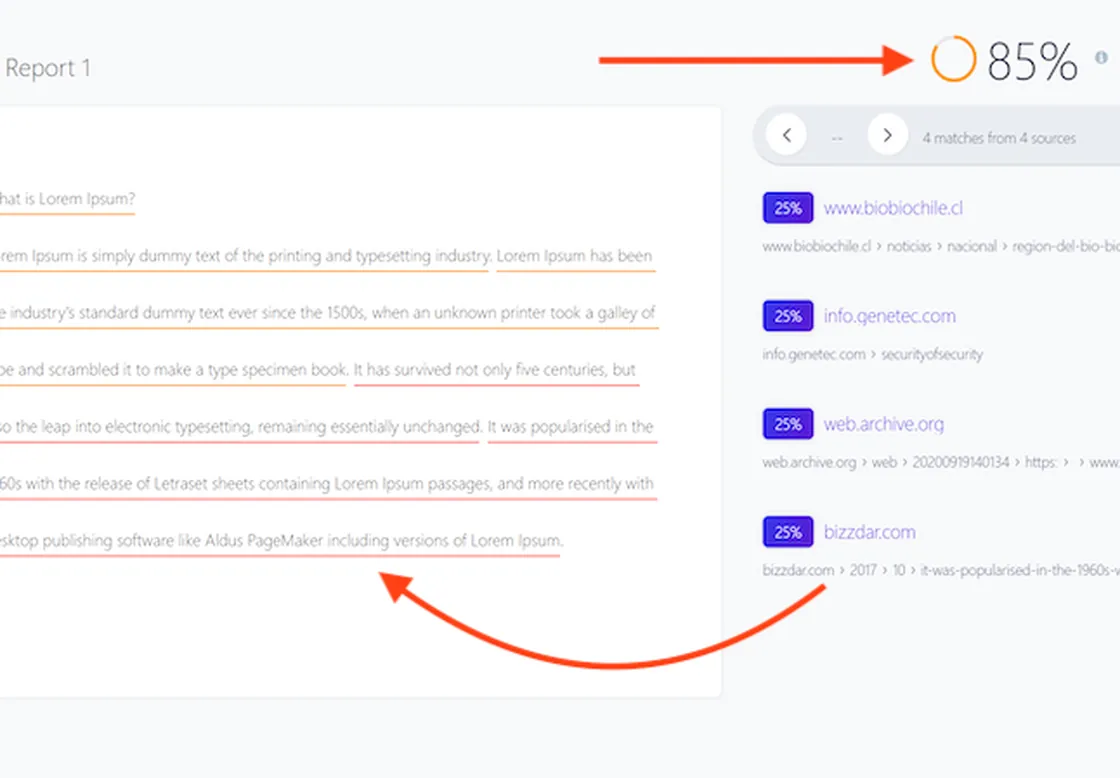
Quetext is an online plagiarism checker that highlights passages with possible matches and links to their sources. Writers and editors can use the report to review quotations and citations before publication.
ProductTally may earn a commission if you buy through these links.
ProductTally may earn a commission if you buy through these links.
For writers and small editorial teams reviewing drafts before publication. Start with an excerpt you are authorized to submit and compare flagged text against the original sources.
The free plan covers up to 1,000 words in the plagiarism checker. The match score is a prompt for editorial review, not a verdict of plagiarism.
Up to 1,000 words in the plagiarism checker.
Free
For individuals. Starts at 100,000 words per month and supports bulk uploads of up to 20 files.
For teams. Starts at 200,000 words per month and supports bulk uploads of up to 100 files.
USD prices for the starting word allowances. Annual prices are monthly equivalents billed annually. Check the vendor’s selector for your currency and word allowance. · Nov 24, 2026
ProductTally may earn a commission if you buy through these links.
Quetext · View official plans and pricingProductTally may earn a commission if you buy through these links.
Open the report, review the highlighted text, and compare it with each source before deciding whether to quote, cite, or revise.
ProductTally may earn a commission if you buy through these links.
Quetext checker and report workflow
ProductTally may earn a commission if you buy through these links.
Quetext’s report highlights potential matches and shows their source pages alongside the draft.
Quetext checker and report workflowOpen the report, review the highlighted text, and compare it with each source before deciding whether to quote, cite, or revise.
Quetext checker and report workflowThe free plan covers up to 1,000 words in the plagiarism checker. The match score is a prompt for editorial review, not a verdict of plagiarism.
Quetext plans and word allowancesRead about Quetext in the ProductTally blog.
Writing & research · 3 min read
Use Quetext to generate an APA reference, then verify the author, date, title, URL and source type against an original press release.