Free
200 promotional credits for new accounts, valid for 31 days
Free
 ProductTally

AI video ads from product URLs
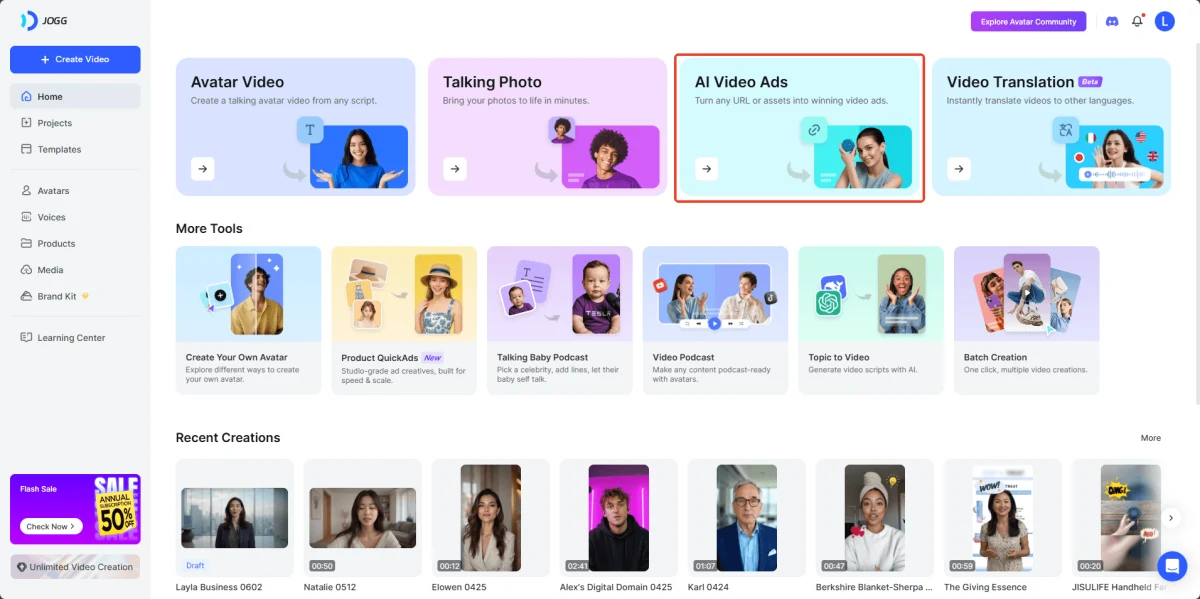
JoggAI turns a product page into an editable video ad with an AI presenter. Draft a short product pitch before booking a shoot.
ProductTally may earn a commission if you buy through these links.
ProductTally may earn a commission if you buy through these links.
Useful for solo sellers and small marketing teams turning one product page into short ads. Start with a page that already has clear images, benefits and specifications.
The free tier has limited tools. Product Ad Tools require a paid plan.
200 promotional credits for new accounts, valid for 31 days
Free
12,000 credits per month
The pricing page also lists Creator, Team and Enterprise. Credit use varies by tool, model and duration. · Nov 12, 2026
The vendor displays $. Confirm billing currency at checkout.
ProductTally may earn a commission if you buy through these links.
JoggAI · View official plans and pricingProductTally may earn a commission if you buy through these links.
Compare the draft with the live product page. Correct prices and claims, and listen to names and measurements in the preview.
ProductTally may earn a commission if you buy through these links.
JoggAI guide to generating video ads
ProductTally may earn a commission if you buy through these links.
URL to Video uses product details to draft a script and gather visuals.
JoggAI URL to Video featuresCompare the draft with the live product page. Correct prices and claims, and listen to names and measurements in the preview.
JoggAI guide to generating video adsThe free tier has limited tools. Product Ad Tools require a paid plan.
JoggAI pricing and free accessRead about JoggAI in the ProductTally blog.
Video · 4 min read
Run a short two-language trial with one brand, version and price, then check audio, captions and regeneration.