
Audio & podcasts · 4 min read
How do you keep the volume consistent across podcast episodes?
Balance voices and use Apple Podcasts’ published loudness and true-peak guidance before export.

First balance the speakers within the episode. Then measure the integrated loudness and true peak of the exported episode. Balancing speakers helps listeners follow a conversation. Measuring the export tells you where the whole episode sits and how much room remains at the peaks. At the same playback volume, check the beginning, the end, and transitions between speakers.
Balance voices before checking the exported mix
FFmpeg documents loudnorm for targeting integrated loudness and true peak. Choose the target for your delivery platform. Start by listening to transitions between speakers and making their voices comfortable at one playback volume.
Check your target platform before delivery
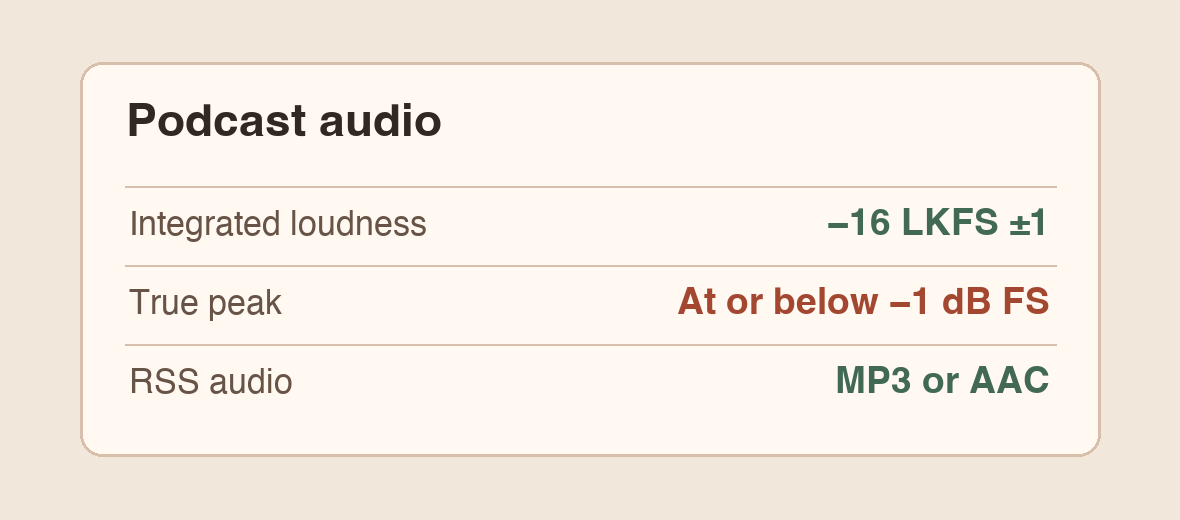
Apple Podcasts recommends preparing audio before encoding at around −16 dB LKFS, within ±1 dB, and keeping true peak at or below −1 dB FS. Record which platform you are targeting and whether you are delivering mono or stereo. After balancing and measuring the master, check the actual export for peaks and intelligibility, especially when using lossy encoding.
Apple lists MP3 or AAC for RSS delivery. If you submit subscriber audio through Apple Podcasts Connect as WAV or FLAC, Apple requires two channels, including duplicated channels for a mono source.